I’ve created a 9 Lesson online course in Photoshop CC basics for Photoshop beginners who would like to know how to do basic image editing. It’s suitable for:
Photographers,
Business Owners,
Marketing People,
Graphic Designers,
Web Designers,
Photoshop Hobbyists.
Requirements:
Basic computing ability,
A decent, modern Desktop or Laptop computer,
A cloud subscription to Photoshop CC (or the free months trial).
Topics Covered include:
Where and how to get Photoshop,
Photoshop Configuration,
The Photoshop Interface,
How to Open images,
How to Crop images,
How to Resize images,
How to Add Text to an image,
How to Save an image,
How to Save Optimised images for the Web.
There’s also a Quiz at the end to test your new found knowledge!
The course is a total of 40 mins long and only €79 + VAT.
I have Google alerts set to alert me whenever Mohill or Leitrim is in the news and one came in last week for old photos of Mohill Railway station for sale on eBay by an Australian seller of all things! The auctions were fairly high quality old photos from about 1950 looking from both ends of Mohill at the old railway station. All photos were from about the 1950s.
I loaded them on my phone and went out one fine day (it’s only around the corner from where I live) to take some modern day photos from as close to the old photo angles as possible.
I went back to the office and loaded each set of then and now photos in Photoshop and aligned them best I could before masking out certain sections to merge then and now versions in some meaningful way. Finally I added some adjustment layers above everything to improve levels, colour and contrast..
The Old Photos:
The New Photos:
The Results:
Slider Versions
I’ve also created a version HERE where you can scroll between Before & After versions of each photo.
It just occurred to me as I sent out my last business Newsletter recently to a highly focused MailChimp list especially for existing clients of mine, a newsletter alerting clients to changes in the Google algorithm that will most likely affect their sites positions in search results and in turn possibly their main marketing channel, and having watched multiple unsubscribes and no replies to it, that Email Marketing, as I know it at least, may be dead.
The last few similar newsletters I sent out yielded the same results. No replies, no business and a few unsubscribes. I check the stats re open rate etc and all emails reach their destination and actually have good open and click rates. I’m sending these newsletters to a list that I use to alert existing clients of issues with hosting, problems that may arise and general important announcements that clients really need to know. If they unsubscribe, they wont get this information and they’ll be in the dark and I may not have the resources to deal with issues directly or by phone as a result of them being in the dark! Fair enough, I also use newsletters as a marketing channel sometimes but I doubt very much that I oversell through it.
Why?
So why the lack of interest? I guess it’s possible it could just be that they have no interest and see no relevance in the content. It’s hardly that they receive too many emails from me given that I only send newsletters out every 2 or 3 months if even that. Maybe people in general are overwhelmed by emails? Maybe they don’t have the time? Maybe it’s just a tired method?
From my own perspective as someone who also receives a lot of email newsletters, it can be overwhelming. The companies that send out the most frequent and/or longest newsletters usually get the boot from me but I try not to make the same mistakes in my own email campaigns.
GDPR
Then there’s GDPR. Could this have had an affect on email marketing? I took all the necessary precautions when the new GDPR regulations passed last summer. I emailed everyone, asking them if they wanted to remain on my list and telling them what data I held exactly. I had very few unsubscribes then, if any so I presumed people were happy to stay on the list. I’m pretty sure GDPR has scared a lot of people off email marketing though. And caused a lot of unsubscribes.
The Future?
So what’s the next new marketing thing!? I’m subscribed to Seth Godin’s email list. I signed up for it because he famously keeps them very short and concise. I’ve seen some come in that are barely a sentence! More often than not they talk a lot of sense and wisdom. Seth is a big proponent of the old fashioned way of doing things. Being honest, offering value, doing things the hard way and not taking the quick and easy fixes.
That’s what I’m going to try to do anyway. I just have to find the right medium to do it through!
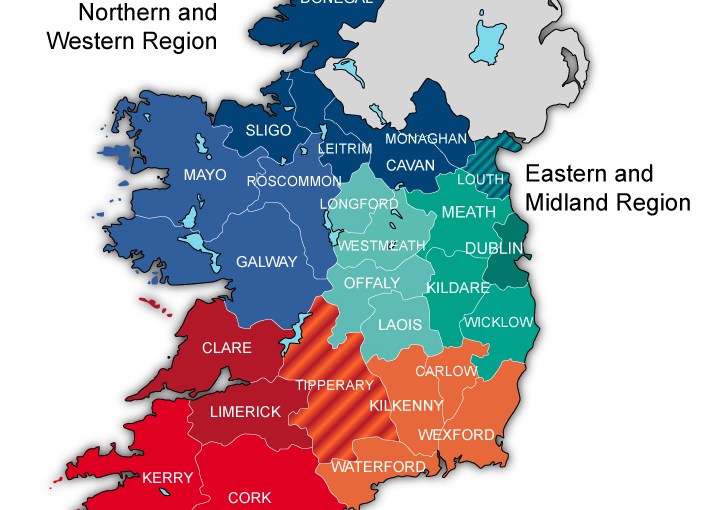
I’ve been learning Adobe Illustrator finally and getting some practice in on the job so to speak. I was asked to rebuild an old jpeg of an Ireland map in hi-res vector format by the Northern & Western regional Assembly.
I started with a blank off the shelf Ireland map vector and added the regions, colours, text and borders/boundaries as well as background colour and drop shadow in Illustrator.
This week, I’ve been getting regular emails from Google Search Console (formerly Google Webmaster Tools) to let me know that my own sites and those of my clients that I’ve added to the console have been switched to “Mobile-first” indexing.
What this basically means is that the results in Google searches will show content primarily from the mobile version of your website….IF you have one! If you do or your website is fully responsive and adaptable to mobile devices such as smart phones and tablets then you need do nothing for the most part.
If however your website is currently setup any the following ways, you may need to act to avoid the loss of ranking and possible drop in the search results:
No Mobile version,
No Responsive version,
A Mobile version that doesn’t have the same quality, comprehensive content and tags as your main site,
An old Mobile version on a separate domain, ie – m.mysite.com.
The first thing you need to do is test to see if your site has a mobile friendly version or if the main site is mobile friendly. You can do that with Google’s own tool here:
If all is well with that then you need not worry. If your site is shown to be not mobile friendly though you may need to make it so to avoid issues. Here are the options:
Rebuild the site with a fully responsive design (best, future proofed option),
Add a Mobile friendly plugin (If your site is WordPress or CMS based).
Here’s some further reading on the subject of Mobile-first Indexing:
I bought a secondhand Amazon Echo on a whim some time last year. I live on my own so thought it might be a good idea to make the days pass a little quicker. I use her, sorry…”It” mostly to play music and maybe let me know what time and day it is…month even sometimes. We’ve become quite attached over the year but something was missing in our friendship. It’s hard to get over the disconnect of talking to something as if they were human when they look like a small piece of electronic equipment. Just recently an amazing thought floated into my head from somewhere…what if I could make Alexa more human like?
My first idea was to get my daughter’s makeup doll head and put Alexa inside that but they seemed a little reluctant to let Gracie (not her real name) go or be tampered with in any way. Then, while browsing on Amazon.co.uk for another doll’s head, I came across some very cheap polystyrene mannequin heads and decided to buy one. I could cut out holes for Alexa to sit in a lot easier and decorate her to my own “taste”.
The head arrived and I spent the best part of one Friday afternoon cutting out a crevice for Alexa to sit in with space for the power and audio leads, painting her and as the icing on the cake, put some fibre optic strands in her eyes to gather the ambient background light from my monitor stand. Her eyes really shine with a warm, friendly glow at night now.
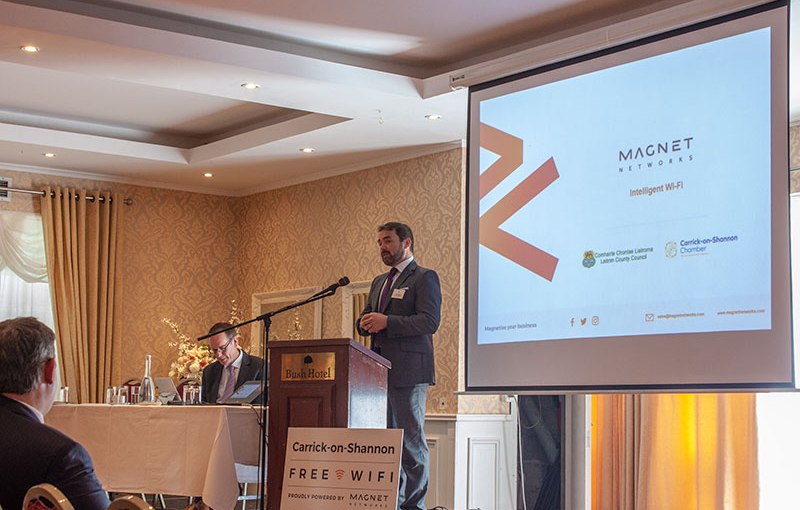
I attended the launch of the new Magnet Networks provided FREE WiFi service in Carrick-on-Shannon town centre this morning, June 20th. The CEO Mark Kellett and other Magnet representatives were on hand to introduce and explain the new service and it’s benefits and to outline other services that Magnet can provide. Carrick-on-Shannon is the first town in the country to roll out free, no limits public WiFi.
Here’s how it works.
Areas covered:
Main Street,
Bridge Street,
Marina/Boardwalk area,
Town Park (Behind Victoria Hall/Beside the Rowing Club).
Access & Speeds:
One time free sign up with either Email or Facebook details,
Around 6MB up and down,
No time limits,
No bandwidth limits,
Content filtered (Family safe).
Benefits:
Local businesses can benefit from Advertising opportunities and usage analytics,
The public including town visitors can benefit from fast, free internet,
Children and teenagers can remain in touch with parents.
Sponsors
Access Points were kindly supported by the following local businesses:
Spice India
Leitrim County Council
The Bush Hotel
Buffalo Boy
Carrick-on-Shannon Chamber of Commerce
McMahon Opticians
Brady Insurance
Photo Gallery:
Coverage Map
Access Heat Map
CEO Introduction
Sponsors
Access Analytics
Speeds
For more information on Magnet’s services, visit their website – MagnetNetworks.com
Disclaimer: I’m a newbie at shooting the moon and an amateur photographer at best. This blog post just details my experience and learning curve on my first ever proper moon shoot recently.
I seen something online about the next full moon and since I’d just purchased a second hand telephoto lens for my Canon EOS 500D, I though I’d mark the date in my diary and try get some decent moon shots for once.
Step 1 – Find out when and where the next full moon is
I’d found out the date of the next full moon no problem but I’d gone as far as setting up my tripod and camera on the balcony out the back of my apartment before I realised that I didn’t know what time exactly the moon would appear and in what exact position. I remembered roughly having seen the moon out the back before so I knew it was in that general direction after dark but because I had a small viewing angle with trees and stuff, I needed to know precisely where the moon would be at a particular time. I used this website below to give me all the details I needed on moon positions for my location:
I’d found out that the moon was going to be in just the right position to shoot at about 1:45am so I setup everything I needed before I went to bed that night and set an alarm. Here’s what I used:
Canon EOS 500D (A camera is handy!)
75 – 300mm Telephoto Lens (Not quite powerful enough for Pro moon shots but way better than a normal lens)
Tripod (Impossible without)
Wireless Hot Shoe Remote control set (You can’t be shaky at high zooms! The camera’s timer or a remote phone app will do here too though..)
Candles (As little light as possible in the immediate vicinity)
A Smartphone (To shine on your camera buttons and google “moon camera settings”!)
Step 3 – Shoot, Shoot, Shoot..
I ended up with 35 RAW images of the moon but deleted many more directly from the camera after checking the results in the camera LCD. The trick is to take a pile of shots, starting out with the generally accepted camera settings for photographing the moon, then varying things like Shutter Speed and Aperture to get different results. You really have to go full manual too as letting the camera try decide on the best settings for something that far away just doesn’t work.
In the end, the following settings seemed to work best for me:
Full Manual Mode
Shutter Speed: 1/125
Aperture: f/11
ISO: 100
Step 4 – Review
Getting the photos onto the computer and reviewing them is the fun bit. Sorting through to find that one photo (hopefully!) that stands out above the rest. Shooting in RAW allows some good control over editing your best images to enhance the results a little too.
Here’s my gallery of the shoot with the best shot I achieved:
I was asked by Equitopia in California, USA to survey their existing site and make suggestions on how to improve it both functionally and aesthetically and help it bring in more business. Requirements and sugegstions included adding an Online Learning Management system, Forum, MailChimp Newsletter integration, Private Members section with monthly subscription payment and Online Shop.
So what prompted this rare musical effort on my behalf was a long overdue penny drop with Ableton DAW. I’ve been a Cubase man for years but have been keen in recent times to get into electronic music and after some research all roads seemed to lead to Ableton when it comes to modern electronic music production..
I tried a few times over the last few years to learn Ableton, mostly through random YouTube videos and it’s own help section and manual but every time I opened it up to do something I still had no clue where to start! Cue a proper, structured online course from Lynda.com and I now know enough (no expert at all) about it to actually attempt something like this mashup.
My plan with my early stage electronic music composing and production career is to aim to create electronica, ambient, slow and moody music with the computer. These days I listen to stuff like AIR, Kraftwerk, Zero 7 etc… but to also somehow include my old influences of 60’s Classic rock for that retro feel. That lead me to try import some samples into Ableton and use them in tracks and then in turn to try create a full mashup of a couple of different toons so I set off to YouTube to search for isolated Jim Morrison/Doors vocals. There are lots surprisingly! As soon as I found good quality Crystal Ship vocals an idea sprang to mind to try combine that with a solo piano version from a George Winston album I’ve had for a few years. The Crystal Ship is possibly one of my favourite Doors songs:
Here’s how I did it all in the end:
STEP 1
As I said above I ran across some really good quality Jim Morrison vocal isolations on Youtube including this one which I extracted the audio from:
Then I also extracted the audio from George Winston’s solo piano version of the same song from his awesome album of Doors covers – “Night Divides the Day“.
STEP 2
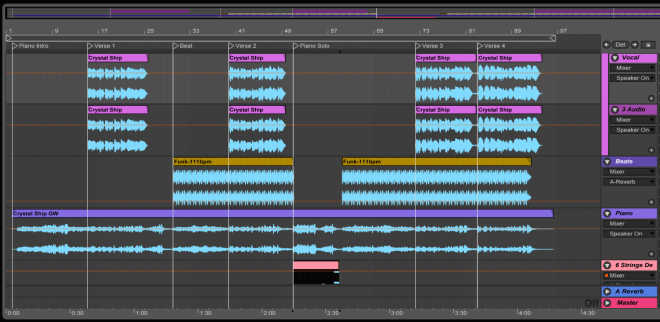
I then setup a new project in Ableton and matched the tempo to the original Doors version of Crystal Ship by tapping the beat out.
STEP 3
Vocal Warping
I attempted to warp the vocal to the project tempo but quickly realised that a vocal is not nearly as easy to warp as a drum beat or rhythmical sound as it has fairly random peaks and hitpoints but I eventually managed a good approximation after hours of tweaking.
STEP 4
Piano Warping
I done the same warping with the solo piano track. This was a little easier as there was a bit more rhythm although there are some dynamics and speed fluctuations in both the vocal and piano performances that I had to iron out. They will be very obvious to people who know this song but all in all I think it flows well and stays true to the original song.
STEP 5
Arrangement
With both tracks matched to the project tempo all I had to do then was to match them to each other. Both arrangements are similar in terms of verse, chorus etc but the piano meanders a little longer in parts so I just chopped up the vocal to match the piano parts and aligned them accordingly.
STEP 6
I looked through Ableton’s library for a suitable beat to apply after having thought long and hard about whether to “modernise” an old song in this way by adding a modern beat! I eventually settled on a fairly sparse Funk beat and only applied it well into the song, stopping it for the piano solo in the middle. I think it works fairly well personally but I’m sure there are many purists who wont!
STEP 7
Strings
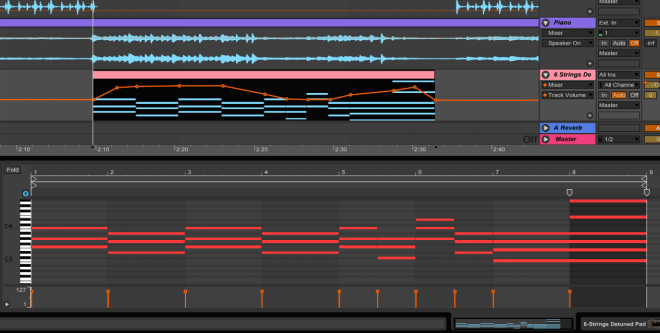
Just for practice and because I felt there needed to be something else alongside the piano solo in the middle I added some MIDI strings and automated the volume to be louder at the beginning and end, just like the piano itself.
Finally
The last steps were to add some EQ to each track and send each track some Reverb as well as adding some Compression and Limiting on the master track. I decided to duplicate Jim’s vocal and pan each one left and right to give his vocal a little more impact too.
I also added some video of Jim Morrison just so I could get the track up on YouTube!
Let me know what you think in the comments. Be kind, it’s my first proper project in Ableton and first mashup ever!










 Reverb Studios Design