Trading Online Vouchers Scheme

It has just been announced that applications for the Trading Voucher scheme are now being accepted (from 1st July 2014). The scheme will allow for qualifying businesses to apply for a grant of up to €2,500 to E-commerce enable your website. Please use my Quote form to send your project details and I will provide the itemised estimate required by the scheme.

For more info on the scheme, please get in touch with your Local Enterprise Office:

Leitrim LEO

Add a Newsletter System to Your WordPress Website

Online marketing is getting a bit harder these days as traditional and even newer methods of selling yourself online are becoming saturated and over used. It’s getting more and more unpredictable whether people will find your blog posts or see your Facebook & Twitter stuff as more and more businesses and competitors clamor to be heard online among a pile of junk and ads..

I’ve always liked Newsletters. They have been around for longer than social media marketing but may have taken a back seat in recent times but they remain an effective marketing tool. For example, top companies with massive mailing lists know they’ll make millions just by sending out a Newsletter with latest products etc..

Here are some of the advantages of using a Newsletter system that we shouldn’t forget:

  • Users can sign up to your list automatically,
  • Marketing material is sent directly to a persons inbox,
  • People can chose to read at a time that suits without having to bookmark,
  • People can unsubscribe (requirement),
  • Minimum marketing effort, maximum reach,
  • Full control over design and action links,
  • Open/Read analytics.

I’ve been using an excellent WordPress Newsletter plugin on this website for a few years now with some success. It can take subscribers automatically from the front end and I can write a nicely formatted and designed newsletter with all the required “view in browser” and “unsubscribe” links to send out to them all from within the WordPress admin. I can also generate offsite code to show the subscription form across the rest of my personal websites and places like my Facebook Page.

Get in touch if you’d like help setting up a Newsletter on your website.

Here’s an example of how a typical Newsletter looks. NB – don’t make them too long!:

Reverb Newsletter


New Reverb Studios Site for the UK & Northern Ireland

I’ve had the domain ReverbStudios.co.uk registered for years now and have finally got around to putting a site up! The site aims to expand Reverb Studios Design’s services to Northern Ireland and the UK and features a quote system and prices in UK Pound Sterling..

Live July 2014 – www.ReverbStudios.co.uk

Reverbstudios.co.uk

My Week Without Facebook – Some Harsh Truths..

It’s a Monday morning and late last Sunday night I decided on a whim (kinda) to deactivate my Facebook account for a week as an experiment. For those of you who know me, none more so than my poor wife you’ll realise that this was a big thing for me to do. I’m very active on Facebook both in my personal account and the many pages I manage. I’ve made some good real life friends on Facebook, generated business leads and sales, provided customer support, kept in touch with distant friends and family, showed off my lovely kids and I also use it effectively for business branding, marketing and sales too so there was an element of “business suicide” about my decision as well. Here are my reasons for leaving Facebook for a week:

What my profile page looked like when I deactivated! Scary..

Facebook Unavailable

Admission

Most important thing out of the way first. Ok, I’ll finally admit it publicly here and now – My name is Leon Quinn and I’m a Facebook addict. I can see the smirk of satisfaction on my wife’s face now. First thing every morning and last thing every night I check Facebook desperate to see those little red notification bubbles and who’s interacted with me and boosted my ego trip. No matter what I’m working on during the day, I constantly switch back and forth to Facebook to see what’s happening. I spend way too much time on it via the phone on evenings and weekends too. I crave the interaction for some reason. I love to read friend’s feeds too just to see what’s happening in my “group” and on the local scene here in Leitrim and my liked page feeds provide great news, tips and education to me. This reading aspect is the real time killer, after all it only takes a matter of seconds to post something or leave a comment. I type fast.

Time

I use RescueTime to monitor my use of both the computer and phone and last weeks report says I spent nearly 9 hours on Facebook for Android and nearly 5 hours on Facebook.com on the PC. That’s 14 hours a week and the best part of 2 full working days. I have a dilemma with RescueTime where it asks me to “categorise” time spent on certain sites as either “distracting” or “productive”. I don’t know which Facebook is! It’s basically both I guess as I get some good business leads, branding and actual paid jobs out of it but this skews my productivity score a bit.
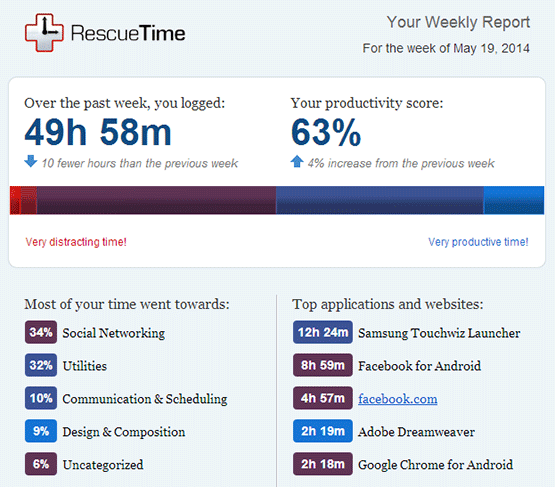
RescueTime

Effects

So what have I noticed after a week without Facebook? Lots of problems I’m afraid! First thing I noticed was my automatic feed from Dlvr.it that takes new blog posts from my various sites and shares them on Facebook went down of course. Next thing I noticed was I had been in conversation with a client Sunday evening via Facebook chat re a problem she was having with her site and suddenly disappearing without giving her a solution probably didn’t go down well! I got her on email though. Also, I lost contact with one or 2 people re selling some items to them.

Business

I pretty much forgot that Facebook Pages need a functioning personal account through which to manage them. Thankfully Facebook don’t take pages down completely when your personal account is deactivated but I can’t respond to any posts, comments or messages which is not ideal. As mentioned above I regularly get contacted via Facebook messages by existing clients for support and by potential new clients requiring quotes and stuff so I had to rely on them being able to find me by other means which shouldn’t be too hard but I can’t be sure that I havn’t lost jobs or money by being missing in action for a week. All my various business pages also went un-monitored and un-managed for a week too and I hate to ignore communication whether in business or personal life. Not being able to post anything new on any page meant I dropped off the radar a bit.

Family

It’s painful to admit but I’m no different (and I always like to be different) to any of the rest of us who has their head buried in a phone all evening despite being in the company of family, in my case a wife and 3 great kids. They crave constant interaction as all kids and wives do but all they see when they look at me is my head buried in a phone interacting with someone else and giving them my time rather then my own family. I’ve tried to justify doing this in the past by saying people, clients etc were asking me stuff and I couldn’t ignore them and that because I have an IT business with clients abroad and that the internet “never sleeps” that I needed to keep checking stuff but I’ve never successfully managed to get this excuse accepted and it’s basically not justifiable on family time.

My Family

Conclusion

Guess what? I survived a week without Facebook and I doubt anyone even noticed I was gone?? People coped fine without my lack of enlightening posts! I ended up getting some stuff done in the office that I couldn’t manage before with the distraction of Facebook like accounts and learning some new stuff. Evenings and weekends with the family were great too. I got to spend some quality time with them and realised they aren’t so bad after all! I got some extra stuff done in the garden and I got to walk the dog a few times too. The poor little fecker has been neglected. I also got more time just to think which is always important.

So the moral of the story is that I’ve learned a lesson. I think we all need to impose some self-dicipline when it comes to social networking in general. Don’t completely drop it because some of us need to be on it for business reasons etc and it remains a fantastic networking and communication tool but moderation and balance is key. Set yourself usage limits and stick to them VERY vigorously.

Leon

WordPress HTTPS Plugin Breaking RSS Feeds

My RSS feed (and all variations of it, ie – atom, red, rss, rss2, etc..) had been giving problems for quite some time, showing up as “not a valid feed” at validator.w3.org/feed and inaccessible through my feed delivery service Dlvr.it which I use to automatically share my posts to Facebook, Twitter etc.. I tried re-uploading all the WordPress core files manually in case any of them had become corrupt. I also tried editing out white/blank space in important theme files like functions.php and wp-config.php but the problem persisted.

Eventually, a deactivation of all of my plugins fixed it but rather than turn on each one of the 50 or so plugins I use one by one to find the culprit, I tried a quick google search for something like “wordpress plugin break rss” and landed on this support thread for the WordPress HTTPS plugin which I’d been using for a while:

http://wordpress.org/support/topic/this-plugin-breaks-the-site-rss-feed

Sure enough, disabling that plugin sorted the issue but I thought I needed it. As it happened, I’d already converted my whole site over to HTTPS so didn’t really need the plugin’s functionality any more so I could safely leave it off. The plugin automatically parsed all non HTTPS url’s in the WordPress content which was handy and the only thing I was missing with it turned off but with a little tweak of my .htaccess file I was able to redirect all HTTP urls to HTTPS anyway.

The fix at the above thread might work for some temporarily but it’s not ideal considering plugin updates will overwrite the changes. I’ve submitted a report request to the developer and will update this post if he/she replies!

Leon


Switch Your Whole WordPress Website to Secure HTTPS SSL

I had cause recently to purchase and install a Secure Cert for this website so I could accept credit card payments securely but since then I’ve seen a few people mention the benefits of fully securing your whole site, not just payment sections. There are benefits for Forms pages and communications with other sites too. Here are some of the steps necessary to switch a whole WordPress site to SSL  as I’ve just done successfully with this one.

Purchase an SSL Cert

These have always been expensive but I found an affordable “Domain Validated” RapidSSL one at €7.85 per year that should work for most small to medium sites at NameCheap.com. There’s a bit to purchasing it and installing it on your server but tutorials are available online and it can be done in a matter of minutes if you’re familiar with the process.

Dedicated IP Address

If you are on a shared hosting server you may need a Dedicated IP address for your site. Mine was on a private VPS so I’d nothing to do. Dedicated IPs should be pretty cheap from your hosting company.

HTTPS Plugin

There’s a great plugin for WordPress that allows you to make certain posts or pages use HTTPS or turn the whole site HTTPS including the admin section. It’s called WordPress HTTPS. It does a pretty good job of converting any urls it finds, including those in your content, to HTTPS automatically.

WordPress Settings

A quick way of switching all the internal urls to HTTPS once you have your secure cert installed is to add https:// to the WordPress URLs in Settings – General.

Theme/Template Tweaks

You may need to go into your theme’s code and convert any absolute http:// url references to relative urls. Especially if it’s old or custom made like mine. I found the following WordPress functions very handy here as it kinda future proofs your site if you ever switch urls again:

bloginfo( 'wpurl' );
bloginfo( 'template_url' );
bloginfo( 'stylesheet_url' );

301 Redirects

Technically search engines may view your HTTP and HTTPS site as 2 separate sites and cry duplicate content. You could sort this by using a 301 redirect in your .htaccess file and using a “Canonical” tag.

Speed Issues

One barrier to switching to HTTPS was that it can slow your site considerably as the encryption processes involved take time and cpu power but I havn’t noticed too much of a slow down. Bigger, busier sites may notice more. Here’s a Response report from Site24x7 for the changeover period (around May 7th). It looks bad but is only a slowdown of about 500ms on the previous weeks report:

HTTPS Speed Report

You may be required to update your website url with other services providers like Google Analytics and Webmaster Tools but that’s a bit beyond the scope of this article!

Leon

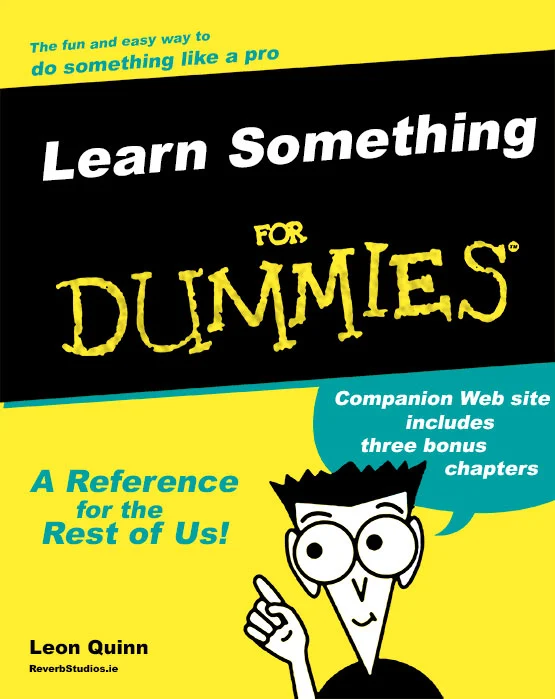
For Dummies Book Cover Photoshop PSD Template

I’ve been meaning to do a few customised “Dummies” book covers in Photoshop but you gotta start with a nice blank canvas so knocked an editable template up this morning based on a typical cover off their own website.

Download the Photoshop PSD below.

It’s 300 DPI and 2381 x 3000px.

PSD Template

Dummies PSD Template

For those without Photoshop, here’s a cool “For Dummies” generator!

Covers.dummies.com

Add Rich Snippets to your WordPress Site and Improve Visibility in Google

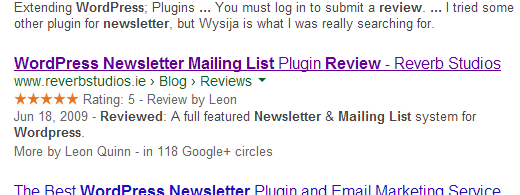
The Rich Snippets thing has passed me by a bit recently and I only decided to look into it when a client of mine asked about it after having done some kind of SEO course. Here’s a full description of what Rich Snippets are on the Google site but basically it’s a way of controlling how you appear in Google search results.

You can have your result stand out from the rest and therefore have a better chance of being clicked simply by adding extra information to the result. In the example below, I’ve set my WordPress blog post to use the “Review” rich snippet which means there’s a star rating on my result in Google. It also includes breadcrumb links to different sections of my site under the main link “www.reverbstudios.ie > Blog > Reviews” as well as adding links to my Google + profile at the bottom. Catches the eye a bit more eh!?

Rich Snippets To set this up on your WordPress based website, first install the “All In One Schema.org Rich Snippets” plugin, activate it then go to Posts – Add New. You’ll see a new box on the post editing screen called “Configure Rich Snippet” which allows you to fill out the info that appears in your Google result. You can currently choose from the following formats:

  • Item Review
  • Event
  • People
  • Product
  • Recipe
  • Software Application
  • Video
  • Article

Whichever format you choose will show a different set of options to be filled in. Simple!

To test if it’s working correctly, use Google’s own Rich Snippet testing tool at – Google.com/webmasters/tools/richsnippets or just Google yourself in a few days!

Leon

Migrate to Google Apps for Business

I switched to Google Business Apps a couple of years back for better management of my Email in particular. I was a bit worried that I didn’t have my Email account setup correctly on my VPS hosting as more and more of my emails seemed to be ending up in people’s spam bins which meant things like invoices went missing and jobs were lost. I reckoned if the Google servers didn’t know the best email setup then no one would! At only about €50 per year, I reckoned it was worth the switch.

Google Business Apps

Anyway, 2 years on and it’s all working well for me. I have my main Reverb Studios email routed through Google which means I’m totally in the cloud and can access email from anywhere on anything that has an internet connection. I don’t have to worry about backup or crappy email clients like Outlook throwing a wobbly and losing all my data. As well as email, my calenders, documents and drive space are all synced across multiple devices.

Unfortunately there’s quite a bit involved in migrating your business email and stuff to Google Apps which is why I’m now offering this as a service to clients who have hosting and a website of their own.

Get in touch for a quote.

Leon