
A website redesign for existing client Moon River pleasure cruiser, Carrick-on-Shannon, Co. Leitrim.
Live March 2012 – www.MoonRiver.ie

A website redesign for existing client Moon River pleasure cruiser, Carrick-on-Shannon, Co. Leitrim.
Live March 2012 – www.MoonRiver.ie
For the last few years I’ve been having an annoying issue with my WordPress sites on VPS hosting. I’ve gone through 3 different VPS/Cloud hosts and the problem remained.
The problem was basically to do with server stability and uptime. My sites were unresponsive and the server was going down intermittently. Server CPU usage was up and I seemed to be using way more space than seemed right for the files I’d uploaded.
The issue was compounded by the fact that I’m not that well up on VPS management and the hosting companies only support VPS issues for a fee! Recently, I had my current host LetsHost.ie tell me that I reached my Inode limit which is basically the number of individual files and folders you can have on a server. Neither of us could understand why the limit was reached as it meant I must have millions of files hosted which didn’t seem possible for the sites I was running. My actual disk space usage was only 50% too.
Turns out that a couple of wordpress plugins on one of my main sites, “Really Simple Captcha”, and Tribulant’s Newsletter plugin had conspired to create millions of individual files in the captcha “tmp” directory. I upgraded the newsletter plugin and deleted the tmp directory files (had to use SSH) and I gained back nearly 100% Inodes and 25% disk space and so far server stability has been fine.
More info on the problem can be found here.
Site redesign and upgrade for existing client P.A.N. Digital, Carrick-on-Shannon, Leitrim.
Live February 2012 – www.WeddingVideosIreland.ie

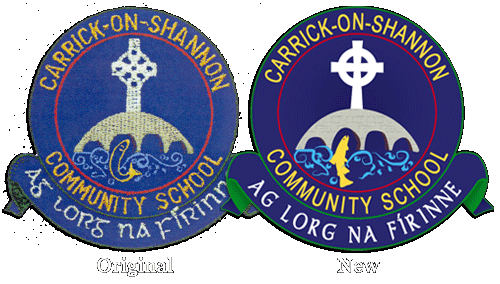
I was asked by the Deputy Principle of Carrick-on-Shannon Community School to provide a hi-res digital version of their school crest for general use but specifically for a large sign outside the school. The original graphics were done back in 1994 and the designer was not contactable so all we had to go on was a jpeg of the embroidered crest from a school jumper!
I’ve done a few of these and quite enjoy them but this job had a little more detail than normal website logos. The process is normally the same each time, I import whatever low-res original I have into Photoshop and blow it up to the required size and proceed to trace out the detail using mostly the ‘Pen’ and ‘Selection’ tools. I fill each large Pen traced area with colour, using gradients if required. I create ‘Paths’ for the circular text and let the text follow that.
For details that can’t easily be traced with common shapes, ie – the fish, water, etc below, I use the ‘Free-form’ Pen tool and just trace by (steady!) hand then use the ‘Stroke Path’ option and some custom brush settings to get some nice line art effects.
Before and After below:
Thanks to Barry Flood for pointing out to me that you can filter or block certain ads or types of ad from appearing on your website via Google AdSense. I never presumed you could and was too lazy to look through the settings in my AdSense account! The reason this came to light is that the ads on this blog were showing content that could be deemed competitive, ie – I seen ads for website building software and companies that could take business away from me! Bit silly eh..
Anyway, here’s how you block ads:
Login to your Google AdSense account at www.google.com/adsense and click on the “Allow & Block Ads” tab at the top. Yeh, it’s pretty obvious, not sure how I missed it!
On the left under “Blocking Options” you can block ads in several different ways:

You’ll need to take a glance at the ad impressions and earnings for each category before you block it to make sure you’re not going to be blocking a great revenue stream but you may have to trade off at some stage. For example “Beauty & Personal Care” and “Hobbies & Leisure” were strong earners for me at about 34% each and I’d gladly have blocked them if it wasn’t for that as they’re not exactly relevant to my content and business. Conversely, the category I did block – “Internet Software & Goodies” is highly relevant but this is the category that kept throwing up competitor ads. It had only 4.2% earnings so I felt it was a safe, calculated gamble to block it.
Leon
Website hosting transfer, general touch up and re brand to Glamping Ireland for Teapot Lane Luxury Camp, Leitrim.
Live November 2011 – www.GlampingIreland.ie

Problem:
My Car key fob casing (Toyota Rav4) was cracking at the blade and about to die and the local Toyota dealer wanted to charge around €250 for a totally new key and transponder. I said it was just the casing that was broke and could they just replace that and he said no! Same story with the other dealers I tried.
Here’s my broken key with some bits of failed fixes including Sugru and Tape!:

Solution:
I reckoned there must be cheap replacement casings for sale somewhere so off I went to good ole eBay. eBay seller Goodtrade.Purple was selling this replacement casing and after a bit of careful reading and matching of Blade sizes, I bought a couple. Both my main key and replacement casings were cracked. They come in the below form with a blank blade that needs cutting:

I gingerly approached the local key cutting shop and asked if they could cut the new blank blade against my existing one and after a bit of head scratching they said they’d give it a go. I thought maybe they wouldn’t be able to get the fob into their machine because you can’t separate the blade from the casing but it cut fine. Next, I removed the Transponder unit from my old key and put it in the new case and screwed it back together.
The new key and replacement both worked perfectly with the car!
Total cost of replacement:
Casing, Blade & Postage from the UK – €6.95
Key Cut – €5
SAVINGS: €238.05!!
Here’s my new key:

Leon
Everyone’s got an opinion or definition as to what cloud computing is all about and why it might be beneficial so here’s mine.
First of all the standard definition:
“Cloud computing is the delivery of computing as a service rather than a product, whereby shared resources, software, and information are provided to computers and other devices as a utility (like the electricity grid) over a network (typically the Internet).” – Wikipedia
And in English:
“Rather than access software on your computer, you access it through a website.” – Leon
Why Cloud Compute? The Benefits:
I write this on a day when it was announced that massively popular Social Networking site Twitter will be setting up an international base in Ireland. There had been murmurings that it might happen from months back but there was stiff competition from a number of other cities including London but Dublin has won out in the end probably because of it’s low corporation tax rate and possibly because of the existing presence of a number of very high profile companies here.
Ireland pretty much has a clean sweep of the top IT companies in the world now including Facebook, Google, Paypal, eBay, Linkedin, Microsoft, Intel, Yahoo, Zynga, IBM, Apple and HP – an incredible list and surely one that puts us firmly on the international business map.
Here’s hoping the government will now throw everything it has at IT support in Ireland from Education to Broadband infrastructure and guarantee we lose the twee image of Ireland and replace it with one of innovation, modernity, hi-tech and progression, leading us out of recession and showing the world how it’s done.
Ole, ole, ole..
Leon







 Reverb Studios Design