Jack L The 27 Club Review

I’m not a CD buyer anymore really but I’m a big Jack L fan and fan of a lot of the ‘27 club‘ – the club of rockers that died at the age of 27 and the music of which Jack covers on this album. My favourite 27 clubber is Jim Morrison so I had to hear Jack singing the Doors covers if nothing else and of all the artists Jack covers on this album, he’s chosen more Doors songs then any other artist (at least jointly!) which is cool! I have heard Jack and Jim mentioned in the same breath on many occasions and while he can’t scream like Morrison, he was made to sing Doors songs.

Jack L Club 27

This album might finally be the one that moves Jack Lukeman onto a higher level of popularity than he’s had so far in his career. I’ve always put his lack of international success down to the simple fact that his songs are not exactly ‘pop’ and have a fairly dark edge, after all it can’t be for lack of talent. Through all the gigs I’ve seen Jack at from a boat in Leitrim to the Olympia, I don’t think I’ve ever heard him sing a bum note!

Some of the songs covered are not written by 27 clubbers themselves but covers they done which is slightly at odds with the marketing for this album but I guess the songs might have been made famous by their illustrious coverers. First off, the Doors songs. Wasn’t too impressed with “Touch Me” or “Alabama Song” the latter of which I would have thought suited Jack down to the ground but “The Crystal Ship” is class. It’s one of my favourite Doors songs anyway so that helped.

With “Love in Vain” by Robert Johnson, Jack playfully turns off the mic as I’ve seen him do in a few gigs to try recreate the old style sound of Johnson’s recordings. Works well..

For me, Jack L is best when he’s singing slow ballads so the slower songs on the album are standout for me but here’s a few of my favourites:

  • Purple Haze – Probably the best song on the album, great ‘slow’ version with lovely electric piano. Reminds me of AIR,
  • Smells Like Teen Spirit – Up there with Purple Haze, great to hear such a different version of the song,
  • Paint It Black – Dark feel with lovely strings,
  • The Crystal Ship – Lovely tune anyway! Some great Piano too,
  • The Killing Moon – Lovely arrangement and strings,
  • Love is a Losing Game – Moving version for obvious reasons.
 Conclusion:
I think I would have preferred an over produced studio version of the songs rather than a live take. Not huge on listening to live music on a CD, only live music when I’m actually there. Having said that it’s great to hear Ireland’s best singer let loose on some of the best songs ever written/recorded. Worth a purchase and listen.
Listen to some demos here.
Buy the album here.

Track List (Track – Band/27 Club member):

  1. Paint It BlackThe Rolling Stones/Brian Jones
  2. Touch MeThe Doors/Jim Morrison
  3. The Killing MoonEcho and the Bunnymen/Pete de Freitas
  4. Purple HazeJimi Hendrix
  5. Voodoo ChildJimi Hendrix
  6. Goin’ Up The CountryCanned Heat/Alan Wilson
  7. Mercedes BenzJanis Joplin
  8. Motorcycle EmptinessManic Street Preachers/Richey Edwards
  9. Smells Like Teen SpiritNirvana/Curt Cobain
  10. Ruby TuesdayThe Rolling Stones/Brian Jones
  11. Up On The RoofThe Drifters/Rudy Lewis
  12. The Crystal Ship – The Doors/Jim Morrison

  13. LithiumNirvana/Curt Cobain
  14. Love Is A Losing GameAmy Winehouse
  15. Keep Dancing – Jack L (This song is Jack’s own ‘dedication’ to the dead)
  16. Thirteen – Big Star/Chris Bell
  17. Jumpin’ Jack FlashThe Rolling Stones/Brian Jones
  18. Love In VainRobert Johnson
  19. Alabama SongThe Doors/Jim Morrison
Leon

The Great VPS Con

I’ve been using Virtual Private Server (VPS) hosting from various different hosts for my own sites for a few years now. I reckoned I’d outgrown shared hosting and liked the idea of having a server all to myself, expecting performance to be much better without having to share with hundreds or thousands of other sites. Its not really worked out like that though..

I currently have about 10 wordpress based sites on my VPS, only a couple of which might be construed as doing anything weird. They both have a lot of plugins and some decent traffic. But all in all, I wouldnt consider that I’m doing anything on such a massive scale to warrant the downtime and slowness problems I’ve been having for ages now. WordPress can be resource heavy but surely servers should know how to deal with it by now?

The thing that annoys me most is that the same sites didnt cause half as much trouble when they were on shared and if they did, support was available quickly and for FREE. VPS support has to be paid for as its unmanaged. I recently had a client move from my shared reseller hosting to a VPS and straight away he had terrible site/server downtime problems none of which happened on my shared. So while VPS hosting is a lot dearer per month than shared, its shared that seems to have the best specs, performance and support. What exactly are we paying for with a VPS so? Control? Is that even important? You really need to know your stuff if control and editing server settings is your thing.

In short, I think I’d only reccommend VPS hosting if you dont have a large wordpress or cms based site and know your way around server settings, but even then make sure you have your own very good reason for having a VPS rather than just thinking it sounds like a good idea or having your host talk you into it.

I’m hoping to switch back to shared soon.

Leon

New Smart Phone Credit Card Payment Facility

Just announcing a new method of payment for client invoices using your smart phone and credit card. I take credit card payments via Paypal already but if you’re one of the people who doesn’t like using Paypal for some reason then you can now pay me via credit card using your smart or web enabled phone, ie – iPhone, Android, Blackberry etc..any phone that allows you to open and view a web page basically.

Usage is simple, either send me your mobile number and ask to pay via Credit Card (Smart Phone) when you receive an invoice or input it on my payment screen here – ReverbStudios.ie/Payments. You will receive an SMS with a secure link to enter your credit card details for the invoice total. Receipts can be issued via email and phone after successful payment.

Payment SMS:

Payment SMS

Payment Screen:

Payment Screen

Credit card payments are handled by SumUp.ie

Bulk Manage WordPress Sites From 1 Location

Just came across the excellent FREE software “InfiniteWP” via a Yoast post on Facebook. I’ve got WordPress Service Contracts setup with some web design clients of mine whereby for a small yearly fee I keep their core WordPress systems and installed plugins up to date. This helps keep their sites secure, fast and modern. Previously, I would have had a plugin on their sites that notified me via email whenever there was a new version of WordPress or any of the plugins installed on a site and I’d have to go login and upgrade or sometimes manually upgrade via FTP. With 24 sites (currently) to manage that turns into a fair bit of work.

Installing InfiniteWP (as a PHP application on my own local server) and adding my clients sites to it now enables me to bulk update plugins, themes and WordPress core from one location right on my own PC in pretty much 1 click! The system requires the InfiniteWP Client plugin to be installed on all sites too which is a bit of hassle but only needs to be done once to create the connection.

The software also handles Backups, Groups and other functionality via paid add-ons..

Leon

WordPress Gravity Forms Plugin Case Study

The WordPress Gravity Forms plugin for constructing complex forms easily on WordPress based sites has been my forms plugin of choice for a few years now ever since I graduated from the clunky and under-powered Contact Forms 7. The value of Gravity forms was highlighted to me on a recent job when I had to rebuild an existing old site with WordPress. The only catch on an otherwise straightforward project was that the client needed to keep his elaborate Quote form.

This quote form basically asked the website visitor for the number of windows in their premises and the dimensions of each one before supplying a quote live on the form page and for 3 different styles of shutter! It also gave quotes for optional extras for each style… Finally the visitor had the choice of emailing the whole quote to themselves. A lot of dynamic field creation based on user choices and some live calculating to be done too. Lots to do!!

I knew the power of Gravity Forms and was kinda confident but it turned out to be a big job that needed all of the plugins power and some revisiting of maths formulas from my school days! I also needed to contact Gravity Forms support for advice and as usual they were quick and helpful. Kudos to Rob there.

Here’s what I needed to do:

Inches to Millimeters Conversion

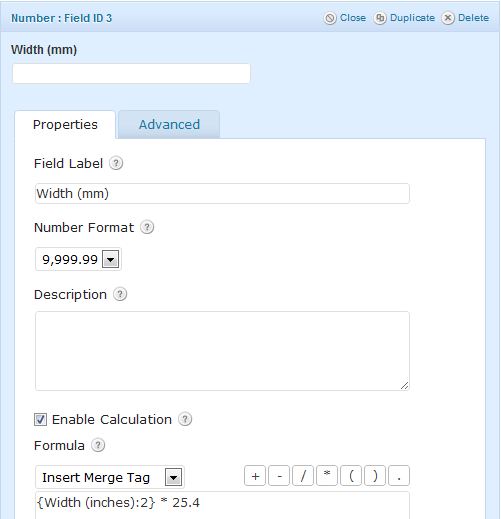
My client needed dimensions in (mm) so the form needed to provide a way for visitors to easily convert their inch measurements if that’s all they had. I added a converter which was simply a ‘number’ field which allowed inputting of inches then another corresponding number field that automatically calculated the (mm) as below. I also added a Radio field above this that asked whether people needed help converting or not and if they did, only then would the converter show. This was made possible by Gravity Forms’ excellent ‘Conditional Logic’ function:

conversion

Number of Windows

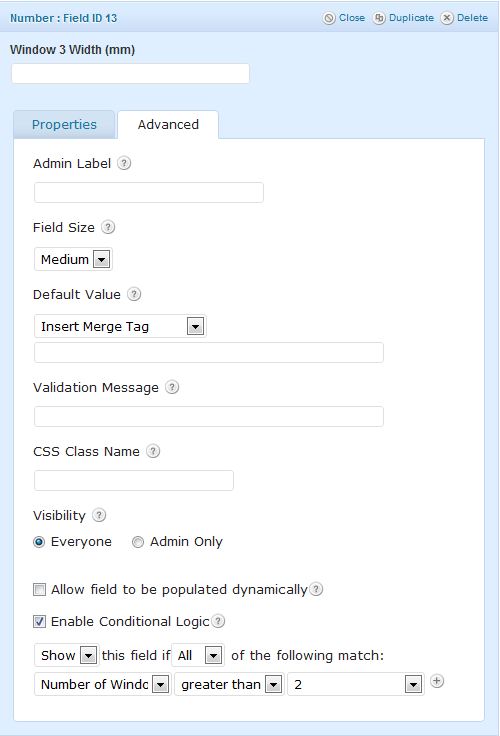
The visitor can pick their amount of windows from a drop down list. That’s the easy bit. But this form had to then dynamically create both Width & Height fields for whatever number they chose. I achieved this using a pile of number fields and some more Conditional Logic. Basically, show 3 width & height number fields if the number of windows chosen is greater than 2, etc.. Here’s an example:

window-number

The Main Quote

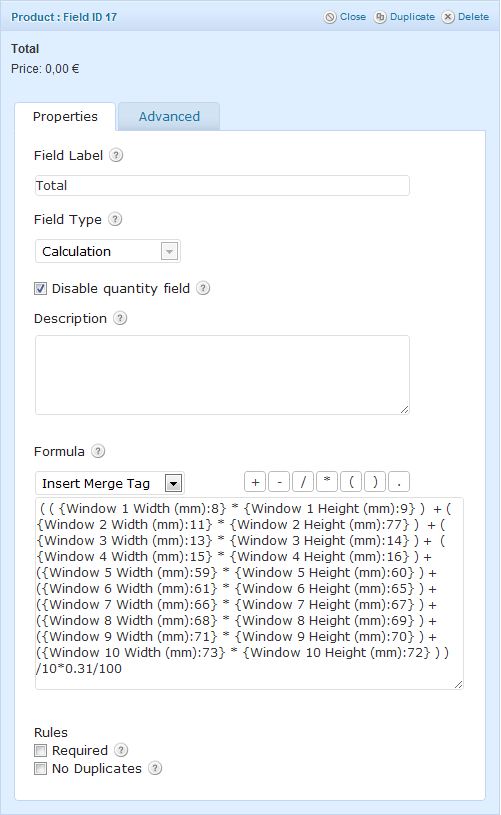
After gathering all the window dimensions, it’s time to provide the total of the quote, live on the page. For this I used a Gravity Form Product Pricing field with Field Type = ‘Calculation’ which basically takes all the window dimensions and multiplies them together then ads each window area then divides by 10, multiplies by a pricing unit and divides the whole lot by 100 to get the quote in euros! Same process for the other style windows. See below and take special note of the length of that Formula box:

total

Extras Calculation

There were some extras offered on the main quote above. I done that by adding another Pricing field and doing something similar to the above. It takes the total from above and multiplies it by a percentage pricing unit to give the additional extra amount.

Email Quote

This was the final and easiest bit. Back to simple form functions and asking for basic visitor details, ie – name, email etc so that the quote details could be sent to the visitor’s email address.

Notifications

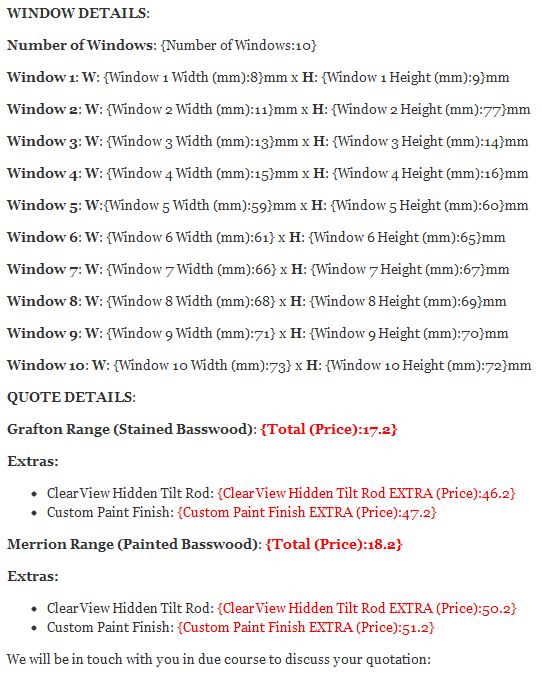
Normally I don’t bother formatting the Gravity Form notification emails. The default ‘All Fields’ option is usually adequate but this lengthy form required a bit of attention to detail. Both the visitor and client needed to get the quote results in a tidy email they could easily refer to and understand and the default notification options just didn’t cut it. See below for the visitor’s notification format I came up with using headings and merge fields:

notification

The final live Quote Form is available to view here for anyone interested in seeing it in action:

www.Shutters.ie

Leon

Drake’s Equation – We Are Not Alone!

Seen some pics of eggs on the net today, can’t remember how or why, followed closely by some story about star birth or some such thing. Decided to put the two together and come up with this composition..as you do.

Background:

I once read a book called “Is Anyone Out There” by Frank Drake and Dava Sobel which was all about SETI (the Search For Extra-Terrestrial Intelligence) and in it Frank Drake came up with an equation which estimates the possiblilities of there being other advanced civilisations in the universe. Here’s the equation:

N = R* • fp • ne • fl • fi • fc • L

Where:

N = The number of civilizations in The Milky Way Galaxy whose electromagnetic emissions are detectable.
R* =The rate of formation of stars suitable for the development of intelligent life.
fp = The fraction of those stars with planetary systems.
ne = The number of planets, per solar system, with an environment suitable for life.
fl = The fraction of suitable planets on which life actually appears.
fi = The fraction of life bearing planets on which intelligent life emerges.
fc = The fraction of civilizations that develop a technology that releases detectable signs of their existence into space.
L = The length of time such civilizations release detectable signals into space.

If you do the maths, it’s nearly impossible to believe we could be alone in the universe, there’s simply too many stars and systems like our own that could support life. For us to be the only one is unthinkable! Fascinating really..

Assets:

Eggs photo from Sxc.hu
Earth photo from Sxc.hu

Process:

I first cut the earth out of it’s background and dragged it into the eggs photo then used the Transform – Warp tool to match the existing yolk shape in the broken egg. I then added  a layer mask to the earth and cut out the parts of it with the Pen tool that overlaid the egg shell to make it look like it fitted inside the shell properly. I needed to lower the transparency of the earth layer to see where I was going doing these.

Next on the earth layer I used Layer Blending Options on the ‘underlying layer’ to bring out the shine on the egg yoke and make it look like it was on the earth too. Adjusting the layer blending also helped with blending the colours and features of the earth onto the egg yolk underneath.

I then added a glow on the earth to mimic the light source on the other eggs via Selection – Fill with white – Gaussian Blur. A new ‘overlay’ shadow layer using the Brush tool was needed to add a little shadow around the top and left of the earth from the egg shell.

Some fine adjustments using the Blur tool on the earth edge and here’s the finished article:

Drake's Equation

How To Change Your WordPress Admin Password via phpMyAdmin

If you’ve got a WordPress site, chances are you’ll get locked out of your admin at some stage whether it be a hacking issue or just plain forgetfulness. First step is to use the ‘forgot password’ function on the WordPress login screen but if you’re hacked or no longer using the email setup in WordPress – General settings then this won’t work.

The way I normally retrieve/reset passwords for myself or clients is to go into the hosting control panel’s phpMyAdmin section and do it manually in the database. Not for the faint-hearted I guess but not that hard when you’re walked through as I’m about to do!

Step 1:

Login to your hosting control panel at something like http://www.yourdomain.com/cpanel and click the phpMyAdmin icon under “Databases” as below:

phpMyAdmin

Step 2:

In phpMyAdmin, choose your WordPress database name top left then click on the “wp_users” table in the resulting table list to bring up a list of user accounts. There will probably be only one user for most people.

Step 3:

Click the “Edit” link on the user you want to change the password for.

Edit User

Step 4:

On the edit user screen, scroll to the “user_pass” row and type/paste in your new password then select “MD5” from the Function dropdown then “Go” at the bottom to save the new password in the database. This encrypts the new password.

Change WordPress Password

That’s it. You can now go back to the WordPress login screen and enter the new password and you should get in fine.

Leon


Mars Curiosity First Drive Tracks in 3D

Just thought I’d apply my old 3D (Stereoscopic, Red & Cyan) Photoshop technique to the latest photos coming from the Curiosity rover on Mars. It”s been for a spin and left some tracks! Obviously I couldn’t be there to take the proper pics you need to for creating 3D composites so I messed with perspective a bit in photoshop instead. Not quite as good but decent.

Get your glasses on and see below. Focus on the rock left of center:

Curiosity 3D