Irish Income Tax Calculator

I’ve been looking for jobs a lot recently and I needed something that would give me my take home pay figure real quick as I glanced at offered salaries on job sites. Here’s one below that shows what you actually get in your pocket each year, month or week. It includes figures for Single or Married as well as higher rate tax bands.

It’s a fairly rough calculation and doesn’t factor in things like tax credits, universal social charges or prsi because there’s just too many variables! Also, for the Married part it presumes you are a single income marriage.

The calculator should give a good indication of salary despite the omissions.

Rates correct as of February 2014.

PS – I hate maths!

[gravityform id=”10″ name=”Income Tax” ajax=”true”]

WordPress Permalink Problems on Register365 Zeus Hosting

A quick post to alert those of you to a small issue with Register365 Linux Zeus Hosting and WordPress. Seemingly while they support the .htaccess files traditionally used to contain the rewrite/permalink rules for wordpress, a lot of the server mod_rewrite functionality doesn’t work and you get the unnecessary “index.php” in every url before the pretty part. Here’s what you need to do to get fully pretty permalinks using the /%postname%/ setting in Settings – Permalinks.

Create a new file called “rewrite.script” with a html editor or notepad. Add the code below, save then upload the file to the root folder of your wordpress installation. Delete any .htaccess file already there.

Next go to Settings – Permalinks in your wordpress admin and choose “Custom Structure” then add just /%postname%/ to the field, ie – delete /index.php if it’s there.

RULE_0_START:
# get the document root
map path into SCRATCH:DOCROOT from /
# initialize our variables
set SCRATCH:ORIG_URL = %{URL}
set SCRATCH:REQUEST_URI = %{URL}

# see if theres any queries in our URL
match URL into $ with ^(.*)?(.*)$
if matched then
set SCRATCH:REQUEST_URI = $1
set SCRATCH:QUERY_STRING = $2
endif
RULE_0_END:

RULE_1_START:
# prepare to search for file, rewrite if its not found
set SCRATCH:REQUEST_FILENAME = %{SCRATCH:DOCROOT}
set SCRATCH:REQUEST_FILENAME . %{SCRATCH:REQUEST_URI}

# check to see if the file requested is an actual file or
# a directory with possibly an index. don't rewrite if so
look for file at %{SCRATCH:REQUEST_FILENAME}
if not exists then
look for dir at %{SCRATCH:REQUEST_FILENAME}
if not exists then
set URL = /index.php?q=%{SCRATCH:REQUEST_URI}
goto QSA_RULE_START
endif
endif

# if we made it here then its a file or dir and no rewrite
goto END
RULE_1_END:

QSA_RULE_START:
# append the query string if there was one originally
# the same as [QSA,L] for apache
match SCRATCH:ORIG_URL into % with ?(.*)$
if matched then
set URL = %{URL}&%{SCRATCH:QUERY_STRING}
endif
goto END
QSA_RULE_END:

PS – if you have wordpress installed in a sub folder then adjust the following line from above to reflect the proper path:

set URL = WORDPRESS-FOLDER/index.php?q=%{SCRATCH:REQUEST_URI}

WordPress Newsletter Embedded Images Extension Review

Images are disabled by default in a lot of email clients these days in order to protect users from viruses etc. You’ve probably got emails in that look awful because the images have been blocked? Maybe some people don’t know how to easily unblock remotely loaded images so your newsletter may never look as intended. Images are probably the most important thing in an email as the viewer is naturally drawn to them rather than a chunk of text. Images normally contain call to actions and information re offers etc.. so having them disabled is not good.

Embedded Images Extension

This handy little extension for the excellent WordPress Newsletter Plugin from Tribulant when installed and activated disables the remote loading of images and instead embeds and attaches them to the email itself so it displays in the receivers client as intended. Once activated you just create newsletters and add images as normal. The plugin handles the image embedding automatically on sending.

A single site licence is only $15.

Features:

  • Upload and activate as a regular plugin.
  • Once activated it integrates with the settings of the main Newsletter Plugin.
  • Specify a folder to contain your embedded images.
  • Image embedding is automatic.
  • Images load immediately on opening email.
  • Emails are cross client compatible.

Download the Embedded Images Extension now.

Leon

Show PSD Photoshop Thumbnails in Windows Explorer

Just a quickie on how to quickly view and scan the contents of Photoshop PSD files on your windows computer without using Adobe Bridge. It’s a damn handy thing to be able to do but surprisingly hard to find the right plugin to do it. Download the zip file below, extract and follow the instructions in the “Readme.txt” file.

PS – I didn’t create this plugin so don’t ask for support or blame me if it doesn’t work! Works for me fine is all I know.

[sws_button class=”” size=”sws_btn_medium” align=”” href=”http://www.reverbstudios.ie/files/psd-thumbs.zip” target=”_blank” label=”Download” template=”sws_btn_apple” textcolor=”” bgcolor=”” bgcolorhover=”” glow=”sws_btn_glow_grey”] [/sws_button]

UPC Ireland Website Contract

I was recently part of a 5 man team of contractors/consultants hired to move the contents and functionality of the existing UPC.ie and Business.UPC.ie sites to a new design and Content Management System, Adobe CQ5/Experience Manager. Work included editing HTML & CSS to make older content fit the new design, building forms and also some re-working/creation of website graphics.

Live January 2014 – www.UPC.ie & Business.UPC.ie

UPC.ie

UPC.ie

Business.UPC.ie

Business.UPC.ie

Forums Are Dead, Long Live Social Networks!

I’ve seen increasing evidence the last few years that Forums, once a novel resource and medium for discussion, are dying or dead. Thank fuck! I like to talk online so I’ve been a member of and managed many forums over the years but to be honest it’s never been anything but hassle. From having completely legitimate and harmless posts removed without warning to dealing with massive amounts of spam posts to the simple fact that forums are just damn slow and hard to navigate/search, they just don’t have a place in modern online discussion anymore. People want the instant, real interaction, results and the kind of social connection you get with the likes of Facebook, Twitter, Google etc..

Recently I’ve been kicked off AskAboutMoney.com for daring to Ask a question rather than Search for an answer! I have yet to see a good search system on a forum and asking a question is a lot easier and quicker. I’ve also had posts removed on Boards.ie because they were on a thread that was old. So old info can’t be updated!? Also had one removed because the informational links I mentioned to a guy who needed some help were deemed commercial because there was an ad on one. It was pretty obvious that I wasn’t trying to sell anything unless you can sell a county news & events service!?

I’ve also seen a lot of software companies dispense with their Forum Support model which I absolutely hated, in favour of old fashioned but effective email support. Having Forum only support is as good as having NO support really.

Forums are only good for wishing you happy birthday. Do yourself a favour and delete your accounts, get away from the censorship and come talk on Facebook.

Leon

Take Secure Credit Card Payments on your WordPress Website

I’ve been able to take Credit Card/Visa payments via Paypal for a while now and more recently via Stripe in conjunction with my invoicing system Zoho but over the last week or so I’ve properly and fully implemented credit card payments on this WordPress based website. On my payment page below you’ll notice a full credit card payment system that processes your payment immediately on this site. The payment page also has a an SSL cert for increased security.

ReverbStudios.ie/Payments

What you’ll need to achieve the same is:

* Stripe requires an SSL cert/Secure payment page to work.

So my Stripe Payment page takes credit card details, processes them on submission and returns the user to a thank you page. Both Gravity forms and Stripe can be configured to send an acknowledgement email/receipt to the user and site owner.

No more paying a pile of money to bank merchant or credit card processing companies!

Here’s some details on Stripe transaction fees.

I can help install the system on your own WordPress based website if you need. A standalone Payment Page/Virtual Terminal like mine here can also be installed on any non WordPress based site also..

Get in touch. Or alternatively ask a question in the comments below.

Leon

Gravity Forms + Stripe Curl_Exec Issue

At the time of writing this the Gravity Forms + Stripe WordPress extension/plugin for Gravity Forms is about the only extension that will add a proper credit card fieldset to an existing form created with the excellent Gravity Forms plugin. I had been taking credit card details via credit card fields setup manually in Gravity Forms then inputting the details in my Stripe account but that was hassle and allegedly a bit insecure!

Unfortunately, my VPS server wasn’t setup correctly to handle the Stripe calls and after having installed The Gravity Forms + Stripe plugin I noticed none of my forms were visible anymore. After a few emails back and forth with the plugin developer Naomi and turning off all my other plugins except Gravity Forms and Gravity Forms + Stripe, I got the following error message:

Warning: curl_exec() has been disabled for security reasons in
/home/reverbst/public_html/wp-content/plugins/gravity-forms-stripe/includes/api/lib/Stripe/ApiRequestor.php
on line 176

To sort this out I had to edit my VPS php.ini file to remove the reference to “curl_exec” in the “disable_functions” line. To do this you’ll need access to change your server settings. Non-VPS or shared hosting customers can’t normally change server settings. You can ask your hosting company to do this for you but I’d say it’s unlikely they will. Hopefully your hosting setup is suitable though.

First off, find out where your php.ini file is or which one your server is using by viewing your PHP info. Upload a file called “phpinfo.php” with the following content only:

<!--?php phpinfo(); ?>

Next, open up an SSH session to your server and login as the root user using something like Putty. Add the following commands to edit your php.ini file. The example given relates to the location of php.ini on my server only:

pico -w /usr/local/lib/php.ini

Finally, run the following command to restart apache so the changes are active:

/etc/init.d/httpd restart

My Gravity Forms + Stripe setup now works perfectly! Here’s my payment form:

Reverbstudios.ie/payments/

Leon

How to Colour Menu Items Differently in WordPress

There might come a situation where you want to have one or two menu items/pages a different colour to the rest as I’ve done with my “Blog” link on this site. You might want to highlight or draw attention to one particular section or even just have every item a different colour for variety!

Here’s a quick how to on how to do it.

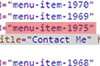
View your website in Chrome for example and right click on the menu item in question and choose “Inspect Element”. We’re looking for the “menu item id” so that’s “menu-item-1975” for my Contact Me menu item.

Menu Item Colour

You now need to add some new CSS to your theme’s stylesheet “style.css”. Add this line for a red highlight:

.menu-item-1975 a {color: #C30;}

or, to give a new background colour:

.menu-item-1975 a {background-color: #C30;}

Leon