The Ultimate Online Payment Option?

I thought I was pretty smart with the payment options I offer clients on my Payment Form. Always offer choice they say. Make it easy for people to pay you they say! So I offered 4 methods:

  1. Credit Card (via Stripe),
  2. PayPal,
  3. Bank Transfer,
  4. Cheque.

Cash in a brown envelope isn’t on the list but obviously I’d take that too!

The latest option I added, Stripe is very cool. Finally being able to take a credit card payment with minimum hassle is awesome BUT. There’s hassle involved with all of the options above. Stripe credit card is probably the easiest method for my clients but I get stung a bit in fees from Stripe. I also get stung with fees from PayPal. Cheques are hassle for both sides and is the slowest method so that leaves bank transfer. When you chose Bank Transfer on my payment form above all it does is give you my bank details but clients then have to go setup a beneficiary in their online banking accounts before they can transfer.

Here’s what I’d like to see..

Electronic Funds Transfer


Some kind of automatic bank transfer method that combines the ease of payment that stripe credit cards offer the client, combined with the low fees of accepting bank transfers. My clients could fill out a form on my site, entering their bank details, name and payment amount and when they click submit my own bank withdraws the money from their account instantly then notifies me that I have funds.

Is that too much to ask!? We’re already doing it in an arse about tit, slow, inefficient and costly way right now. It just needs some tweaking.

Leon

Delete WordPress Posts Older then (X) Days in PHPMyAdmin

I stumbled across this as a possible fix for slow loading and resource hogging websites that have LOTS of content, especially posts numbered in the thousands. Something like the Google spider could use up your sites bandwidth and resources pretty quick if it has to try index thousands of old posts. Most sites might not need to keep older posts live because they will have become irrelevant and outdated over time.

Delete Posts

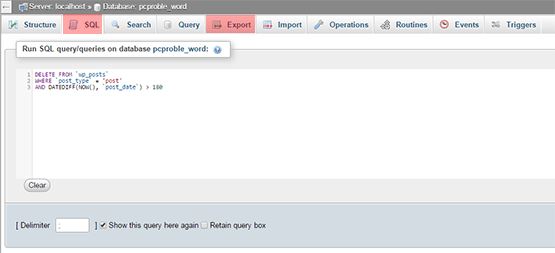
Login to your hosting control panel then click on the phpMyAdmin icon. Click the name of your sites database then “Export” on the top bar just to make a database backup first in case anything goes wrong. Choose “gzip backup” in advanced settings if your database is huge. Next click the “SQL” title on the top bar and paste the following in the box then click Go bottom right:

DELETE FROM `wp_posts`
WHERE `post_type` = 'post'
AND DATEDIFF(NOW(), `post_date`) > 180

What the above SQL command does is delete all blog posts in your site’s database with the posts type “Posts” as opposed to Pages and it deletes everything older than 180 days or 6 months. You can adjust this to suit yourself of course.

Once you’ve done this you might consider installing the Auto Prune Posts WordPress plugin to keep things tidy automatically in future.

Leon

Is Responsive Web Design Necessary!?

Responsive web design is everywhere. It’s become the one “must have” thing that nearly every one of my own new and existing clients asks for and I suspect by their language that they don’t even really know what it is! They’ve just heard it mentioned somewhere, perhaps on some social media course.

The first thing we should start with is a definition I suppose. My own definition as I understand it is this:

Responsive Web Design involves building a website layout or design that “responds” or more accurately “adapts” to whatever device it’s showing on.

Responsive web design exists as a supposed solution to the (quite considerable) problem of designing a layout that is consistent across a crazy number of different screen sizes and resolutions. Traditionally what was done was a different mobile friendly and more minimalist version of the site was shown in place of the original full design. This involved browser/device detection that wasn’t always accurate and you also needed to build two or more versions of your website at greater time and expense not just to build initially but also to maintain.

Responsiveness was a fairly commendable and logical way of sorting the issue requiring as it does just one version of a site that changes shape to suit the screen size or even orientation.

Here’s my first problem!

Why has it come to be known as “responsive” rather then “adaptive”!? To me the word “responsive” means a response to something that happens. An actual event that requires a response. A phone merely existing doesn’t really require a response!? “Adaptive” is a far better word. The website adapts to whatever obstacle it encounters.

Second problem.

Nothing stays the same. It’s getting pretty hard to get a good modern smart phone with a small screen size. “Phablets” (cross between phone and tablet) like the new iPhone 6 are pretty massive and very capable of showing a full static website layout in all its intended glory without moving stuff around.

Third problem.

I don’t like the liberties responsive design takes with your design. It completely rearranges your layout, resizes your images and other block elements, making some way louder or quieter that you intended. Menus are often completely collapsed into an icon you have to click on to navigate requiring an extra step for the user.

Fourth problem.

Responsive design is supposed to get over the problem of having to pinch in and out of your screen to zoom but when it rearranges your content into one long single column you are scrolling endlessly!? See my short video below and see which you think is more effort:

Conclusion

I’ll build a responsive site if you really want. It’s not extra hassle and it certainly wont cost you more. It’s probably easier for me actually! But please entertain the possibility that you may not need a responsive site. It’s just another option.

Leon

E-Day – Down with Cheques

I’d like to tell you a little story about a recent project I worked on and how payment for it was incredibly slow partly due to the inefficiency of cheques!

I rebuilt a website for a 3rd party client via a client of my own in February this year and have only just been paid. On the 20th August my client was asked to come to a meeting with the 3rd party guy so he could give him a cheque for the work. Here’s what happened next:

  1. My client receives the cheque and lodges it in his account manually,
  2. We wait a week for the cheque to clear,
  3. My Client writes a cheque from his account for me,
  4. Client travels to post cheque to me,
  5. Over a week later, still no sign of the cheque my end,
  6. Client cancels cheque,
  7. Client sends payment via PayPal,
  8. Money cleared and ready to spend within 2/3days.

Total waiting time of around 30 days from when the initial cheque was written to me being able to spend the money! And a total of around 7 months waiting for payment from when the work was complete!

Can anyone see the problem here!?

Today the 19th September 2014 is “E-day” when all government departments will cease sending and receiving cheques for payment in favor of electronic payments such as Debit Card and Electronic Funds Transfer (EFT). It is estimated that €1 billion is lost yearly in Ireland through cheque usage and it creates massive cashflow issues for small businesses like mine. I think all non-government business should follow suit and abandon cheques for digital payments. It’s easier and cheaper for all concerned.

More info on E-Day here – Jointheevolution.ie

Let me know if you’d like help setting up a Credit/Debit card payment system on your website.

Leon

How to Update Gravity Forms on Multiple sites with InfiniteWP

I use the FREE InfiniteWP to update WordPress core and plugins across about 40 of my own and client’s websites. It’s a real time saver. It works perfectly with plugins hosted in the WordPress repository but I use a few commercial plugins not hosted there and it can’t update these. Gravity Forms for example is one I use across nearly all my sites and that can’t be updated automatically with InfiniteWP. They have assured me that they are working on a fix to allow auto updating of Gravity Forms but for now here’s a workaround suggested by InfiniteWP:

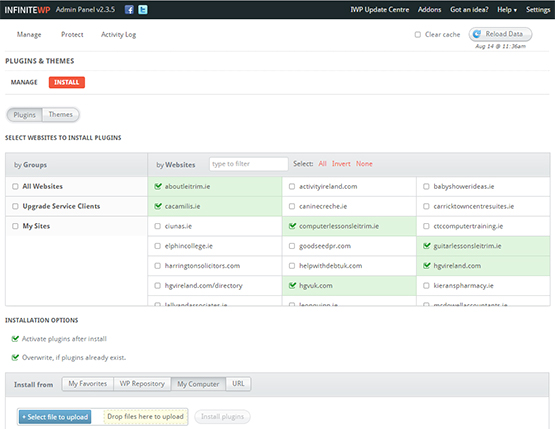
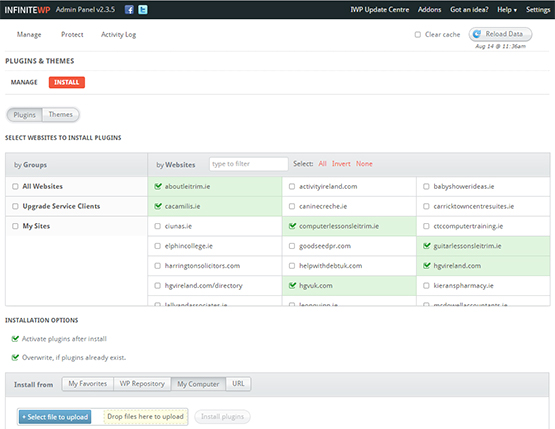
Login to your InfiniteWP admin and click “Plugins & Themes” under “Manage” top left. Then select “Install” and pick some sites to install the new/updated plugin into.

You can choose to install a plugin from the following sources:

  • WordPress Repository
  • Your Computer
  • Remote URL

I chose My Computer because Gravity Forms is hosted in a private account with login so I just logged in, downloaded the latest version and used that file.

There are further options you can tick including: Activate plugin after install” and “Overwrite if plugins already exist” which you’ll probably want to select if you’re updating an existing plugin.

Once you upload the file you can hit “Install Plugin”.

infinitewp

Leon

Anatomy of The Perfect Tweet

I was sitting watching the World cup semi-final last night between Brazil and Germany and checking out Twitter at the same time for reaction to events on the pitch. A most enjoyable experience was had by all! As you might know by now if you follow football, Brazil got hammered at home 1 : 7 and twitter could barely keep up. I’d only get a tweet out then another goal would go in (6 in 4 minutes from the Germans!?). I seen some great, great tweets and tried to add a few funny ones of my own but I just wasn’t in the same league as Colm Toibin who writes stuff for TV and is always wickedly funny.

During the game he tweeted this:

It was the standout tweet for me from the night and it currently has 358 RTs and 340 favorites. Here’s why I think that tweet was so great and what I think you need to do/be when creating any kind of viral content online:

Topical

Obviously the tweet was topical and of the moment. It helped that a large majority of the planet and twittersphere were all watching the same thing and watching the same news story unfold so there was a ready made audience for Colm.

Exceptional

It was no ordinary game of football. Brazil hadn’t lost at home for nearly 40 years and no one had ever scored that many goals against the opposing team in a semi-final of a world cup…ever. The sense of history being created led to a hunger in people for content, quotes, opinions of others, etc..

Funny

There were losts of humorous tweets on the night, many mashing up the football with the other big news story of the day in Ireland at least, that the 5 Garth Brooks gigs were cancelled. A lot of the same jokes were repeated. Colm’s humor, as usual was a bit different and on a higher level. What he done was basically repeat the same quote that many including TV panelists were making, ie – “This is the worst Brazil team since….” and added a different, more personal dimension. See below.

Personalise

A great many of us now 30, 40 or 50 somethings who played football out on the street as kids would have played “world cup” in which an individual kid or whole team would pretend to be a team from the world cup and pretend, best they could to emulate their style of play or moves they’d seen on the tv. Everyone always wanted to be Brazil of course! The tweet also refers back to a time when Brazil and football in general was a bit more classy. So there was a nice nostalgic feel.

HashTags

To make sure your tweet is included in the general discussion on a certain topic and gets the maximum amount of views, always remember to include a hash tag. Not too many. One should be fine. Colm included the official World cup tag #WorldCup2014.

So in general..be funny, be memorable, be better, be topical and you won’t go far wrong.

Leon


Trading Online Vouchers Scheme

It has just been announced that applications for the Trading Voucher scheme are now being accepted (from 1st July 2014). The scheme will allow for qualifying businesses to apply for a grant of up to €2,500 to E-commerce enable your website. Please use my Quote form to send your project details and I will provide the itemised estimate required by the scheme.

For more info on the scheme, please get in touch with your Local Enterprise Office:

Leitrim LEO

My Week Without Facebook – Some Harsh Truths..

It’s a Monday morning and late last Sunday night I decided on a whim (kinda) to deactivate my Facebook account for a week as an experiment. For those of you who know me, none more so than my poor wife you’ll realise that this was a big thing for me to do. I’m very active on Facebook both in my personal account and the many pages I manage. I’ve made some good real life friends on Facebook, generated business leads and sales, provided customer support, kept in touch with distant friends and family, showed off my lovely kids and I also use it effectively for business branding, marketing and sales too so there was an element of “business suicide” about my decision as well. Here are my reasons for leaving Facebook for a week:

What my profile page looked like when I deactivated! Scary..

Facebook Unavailable

Admission

Most important thing out of the way first. Ok, I’ll finally admit it publicly here and now – My name is Leon Quinn and I’m a Facebook addict. I can see the smirk of satisfaction on my wife’s face now. First thing every morning and last thing every night I check Facebook desperate to see those little red notification bubbles and who’s interacted with me and boosted my ego trip. No matter what I’m working on during the day, I constantly switch back and forth to Facebook to see what’s happening. I spend way too much time on it via the phone on evenings and weekends too. I crave the interaction for some reason. I love to read friend’s feeds too just to see what’s happening in my “group” and on the local scene here in Leitrim and my liked page feeds provide great news, tips and education to me. This reading aspect is the real time killer, after all it only takes a matter of seconds to post something or leave a comment. I type fast.

Time

I use RescueTime to monitor my use of both the computer and phone and last weeks report says I spent nearly 9 hours on Facebook for Android and nearly 5 hours on Facebook.com on the PC. That’s 14 hours a week and the best part of 2 full working days. I have a dilemma with RescueTime where it asks me to “categorise” time spent on certain sites as either “distracting” or “productive”. I don’t know which Facebook is! It’s basically both I guess as I get some good business leads, branding and actual paid jobs out of it but this skews my productivity score a bit.
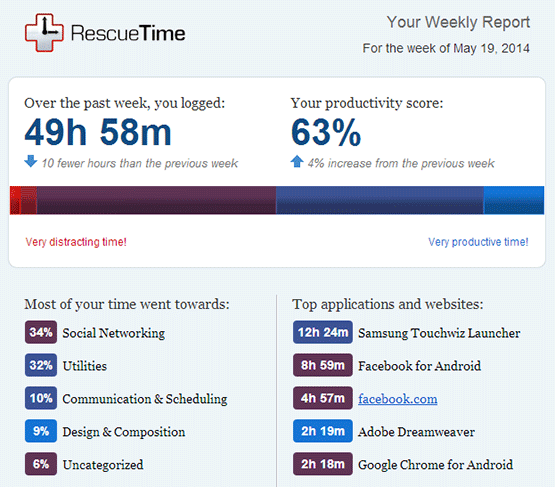
RescueTime

Effects

So what have I noticed after a week without Facebook? Lots of problems I’m afraid! First thing I noticed was my automatic feed from Dlvr.it that takes new blog posts from my various sites and shares them on Facebook went down of course. Next thing I noticed was I had been in conversation with a client Sunday evening via Facebook chat re a problem she was having with her site and suddenly disappearing without giving her a solution probably didn’t go down well! I got her on email though. Also, I lost contact with one or 2 people re selling some items to them.

Business

I pretty much forgot that Facebook Pages need a functioning personal account through which to manage them. Thankfully Facebook don’t take pages down completely when your personal account is deactivated but I can’t respond to any posts, comments or messages which is not ideal. As mentioned above I regularly get contacted via Facebook messages by existing clients for support and by potential new clients requiring quotes and stuff so I had to rely on them being able to find me by other means which shouldn’t be too hard but I can’t be sure that I havn’t lost jobs or money by being missing in action for a week. All my various business pages also went un-monitored and un-managed for a week too and I hate to ignore communication whether in business or personal life. Not being able to post anything new on any page meant I dropped off the radar a bit.

Family

It’s painful to admit but I’m no different (and I always like to be different) to any of the rest of us who has their head buried in a phone all evening despite being in the company of family, in my case a wife and 3 great kids. They crave constant interaction as all kids and wives do but all they see when they look at me is my head buried in a phone interacting with someone else and giving them my time rather then my own family. I’ve tried to justify doing this in the past by saying people, clients etc were asking me stuff and I couldn’t ignore them and that because I have an IT business with clients abroad and that the internet “never sleeps” that I needed to keep checking stuff but I’ve never successfully managed to get this excuse accepted and it’s basically not justifiable on family time.

My Family

Conclusion

Guess what? I survived a week without Facebook and I doubt anyone even noticed I was gone?? People coped fine without my lack of enlightening posts! I ended up getting some stuff done in the office that I couldn’t manage before with the distraction of Facebook like accounts and learning some new stuff. Evenings and weekends with the family were great too. I got to spend some quality time with them and realised they aren’t so bad after all! I got some extra stuff done in the garden and I got to walk the dog a few times too. The poor little fecker has been neglected. I also got more time just to think which is always important.

So the moral of the story is that I’ve learned a lesson. I think we all need to impose some self-dicipline when it comes to social networking in general. Don’t completely drop it because some of us need to be on it for business reasons etc and it remains a fantastic networking and communication tool but moderation and balance is key. Set yourself usage limits and stick to them VERY vigorously.

Leon
For Dummies Book Cover Photoshop PSD Template

I’ve been meaning to do a few customised “Dummies” book covers in Photoshop but you gotta start with a nice blank canvas so knocked an editable template up this morning based on a typical cover off their own website.

Download the Photoshop PSD below.

It’s 300 DPI and 2381 x 3000px.

PSD Template

Dummies PSD Template

For those without Photoshop, here’s a cool “For Dummies” generator!

Covers.dummies.com