An informational website for the new Carrick-on-Shannon Coder Dojo on which I’m a mentor. Currently in pilot phase and hoping to be running properly by late January.
The website is fully responsive and features signup forms for Ninjas and Mentors as well as a Newsletter system and session ticket booking via Eventbrite. All forms are connected with MailChimp remotely.
I stumbled across this as a possible fix for slow loading and resource hogging websites that have LOTS of content, especially posts numbered in the thousands. Something like the Google spider could use up your sites bandwidth and resources pretty quick if it has to try index thousands of old posts. Most sites might not need to keep older posts live because they will have become irrelevant and outdated over time.
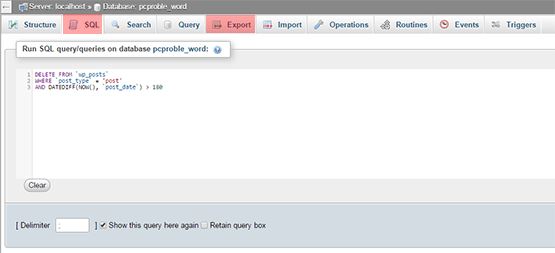
Login to your hosting control panel then click on the phpMyAdmin icon. Click the name of your sites database then “Export” on the top bar just to make a database backup first in case anything goes wrong. Choose “gzip backup” in advanced settings if your database is huge. Next click the “SQL” title on the top bar and paste the following in the box then click Go bottom right:
DELETE FROM `wp_posts`
WHERE `post_type` = 'post'
AND DATEDIFF(NOW(), `post_date`) > 180
What the above SQL command does is delete all blog posts in your site’s database with the posts type “Posts” as opposed to Pages and it deletes everything older than 180 days or 6 months. You can adjust this to suit yourself of course.
Once you’ve done this you might consider installing the Auto Prune Posts WordPress plugin to keep things tidy automatically in future.
Responsive web design is everywhere. It’s become the one “must have” thing that nearly every one of my own new and existing clients asks for and I suspect by their language that they don’t even really know what it is! They’ve just heard it mentioned somewhere, perhaps on some social media course.
The first thing we should start with is a definition I suppose. My own definition as I understand it is this:
Responsive Web Design involves building a website layout or design that “responds” or more accurately “adapts” to whatever device it’s showing on.
Responsive web design exists as a supposed solution to the (quite considerable) problem of designing a layout that is consistent across a crazy number of different screen sizes and resolutions. Traditionally what was done was a different mobile friendly and more minimalist version of the site was shown in place of the original full design. This involved browser/device detection that wasn’t always accurate and you also needed to build two or more versions of your website at greater time and expense not just to build initially but also to maintain.
Responsiveness was a fairly commendable and logical way of sorting the issue requiring as it does just one version of a site that changes shape to suit the screen size or even orientation.
Here’s my first problem!
Why has it come to be known as “responsive” rather then “adaptive”!? To me the word “responsive” means a response to something that happens. An actual event that requires a response. A phone merely existing doesn’t really require a response!? “Adaptive” is a far better word. The website adapts to whatever obstacle it encounters.
Second problem.
Nothing stays the same. It’s getting pretty hard to get a good modern smart phone with a small screen size. “Phablets” (cross between phone and tablet) like the new iPhone 6 are pretty massive and very capable of showing a full static website layout in all its intended glory without moving stuff around.
Third problem.
I don’t like the liberties responsive design takes with your design. It completely rearranges your layout, resizes your images and other block elements, making some way louder or quieter that you intended. Menus are often completely collapsed into an icon you have to click on to navigate requiring an extra step for the user.
Fourth problem.
Responsive design is supposed to get over the problem of having to pinch in and out of your screen to zoom but when it rearranges your content into one long single column you are scrolling endlessly!? See my short video below and see which you think is more effort:
Conclusion
I’ll build a responsive site if you really want. It’s not extra hassle and it certainly wont cost you more. It’s probably easier for me actually! But please entertain the possibility that you may not need a responsive site. It’s just another option.
I’m pleased to announce that despite never having attached much weight or significance to qualifications, certifications, exams or courses, preferring instead to learn whatever I specifically needed to know and only when I needed to know it, I have now become officially certified by Adobe in their latest version of Photoshop, CC! The reasoning behind it was that after 12 years of using Photoshop, I thought maybe it was the right time to get some kind of recognition and have something more to show! Also, I hope to use the certification to get more Photoshop work and maybe start to offer some training courses or one to one mentoring so get in touch if that’s what you need.
I thought I’d sail the exam having used Photoshop for so many years now but the exam was pretty hard and required a fair bit of preparation including taking a few online refresher courses, watching a pile of videos and taking some mock exams online in the weeks leading up to the exam in Dublin’s Exam Centre.
I got an email from Stripe payments to let me know that a recent credit card transaction on my site had used the SSL 3.0 protocol on my server and that this was possibly insecure due to the recent “Poodle” vulnerability. They said that they would be removing support for SSL 3.0 in Stripe soon and that my existing credit card forms would no longer work.
The fix for this is server based and essentially you need to remove support for the SSL 3.0 protocol on your server in favour of TLS. All modern servers should support TLS but you might need to tell them to or tell them to disable SSL 3.0. Contact your host if you are on a shared server. If you’re on a VPS like me you can do this yourself in WHM/Cpanel as below:
Go to WHM => Service Configuration => Apache Configuration => Include Editor => Pre Main Include.
Select a version or All Versions.
Add the following in the text box that appears:SSLHonorCipherOrder On
SSLProtocol ALL -SSLv2 -SSLv3
Press the Update button and then “Restart Apache”.
We’d been having weird, intermittent WiFi problems in the house for months and I kinda stumbled on the solution over the weekend. Basically, the various devices on WiFi in the house were struggling to connect to the network, particularly our smart phones. While the home network could be seen, it wouldn’t connect automatically as set and manual connections just failed with the error “Connection Authentication Error”. It was annoying not least because my MiFi router is located in the attic for best house coverage and I had to keep climbing up there to restart it in the hope of it sorting itself out. I also had a booster in the attic to help spread the signal to the furthest reaches of the house so I was sure the MiFi unit itself or this booster were at fault and was ready to replace them until I realised that multiple devices where having the same error, including my wife’s brand new phone and in various different rooms all over the house.
So what else could it be? Something I read online started me wondering if there was a limit to the number of devices you can normally have connected to a typical broadband router and because the MiFi router wasn’t a typical one, maybe it had an extra low limit or something? I wondered if the limit could be raised so I logged into my MiFi control panel and seen a screen that showed the max number of connected clients allowed, which was 5 so I tried changing it to 10 and saving but it returned an error stating that 5 was the max! So the standard MiFi router that 3 Ireland use is the Huawei E5220 seen below and it’s only capable of handling a max of 5 connected devices at once! Not much use with a laptop, 3/4 smart phones, a Sky box, a Chromecast, a Nest Thermostat, WiFi light bulb and regular visitors with smart phones! Basically all our devices were vying for a coveted spot on the network and sometimes one got it over another etc which explained the intermittent part of it all perfectly.
E5220
So what’s the solution?
I googled around looking for a way of raising the limit but it seems you have to mess around with the devices firmware etc. Not into that! I also thought about reverting to my old 3G Broadband UMR router but couldn’t find my old 3 dongle. Then I realised that just like your phone account/contract, your mobile broadband account is also upgradable, ie – you can qualify for an upgrade to a new device after your contract runs out. So I went on the 3 site and logged in than hit the “Am I eligible for an upgrade” link and I was luckily. Also, 3 currently have a couple of new devices that have a connection limit of 10 devices, double the MiFi’s so I went for the smaller one which was completely covered by the upgrade for free. It’s the NetGear AC762S seen below. It’s also 4G which is handy if that ever comes to Leitrim but I’m not holding my breath. 10 devices should sort us out for a little while longer at least!
I have to admit, this was an impulse buy for me after I seen it mentioned on Facebook. It was pretty hard to resist a cross between an iPhone and a “smart” thermostat and rarely have I got so excited about a household appliance type thing! It’s kinda pricey at about €220 from Store.nest.com/ie/ and it had only just gone on sale in Ireland when I bought it so it was kinda unproven here but the promise of smarter heating and possibly reduced heating bills helped me justify the expense to the wife. The reports online were all pretty positive too and the caliber of the companies behind it put me at ease further.
Nest Thermostat
Background
Apparently, the guys behind it used to work in Apple on the iPhone and you can definitely see similarities in design and interface. Google bought the company behind the Nest earlier this year for billions and has plans to add cool new features such as voice control and integration with other home automation products and even Mercedes cars! Everything about the process of buying and installing the Nest “Learning” Thermostat was fairly smooth and professional from their website and checkout etc to device control, except maybe the delivery time as mine seemed to get lost for over a week somewhere between The Netherlands and here. I was also slightly disappointed to see that there was an extra box (Heatlink) and level of install complexity over and above what I had seen online for the US version which meant I had to get an installer out to put it in for me. Luckily, I just caught a free install period though. People handy at DIY should be able to manage the install themselves though. For the Irish market, the extra Heatlink box basically connects to whatever wires your old controls were connected to and the Nest can then be wired directly to the Heatlink or moved anywhere else in the house within 30m. The Nest communicates with the Heatlink wirelessly but needs to be plugged in if it’s not wired directly to it.
Nest Android App
Control
The Nest website, web control dashboard and mobile apps are all very user friendly and simple and everything worked flawlessly straight out of the box including connection to home Wifi and your Nest online account so it can be controlled remotely. The unit asks all kind of questions on start up from the year of construction of your house, to fuel type, to floor size, to room location in an effort to teach itself as much as possible about your setup and run as efficiently as possible which makes it pretty reassuring. It also updated itself on first run. I like devices that update themselves and add new features & fixes all the time! There’s a nice feel to the unit too. It’s has a heavy, quality feel to it and using it (by pressing the face in and turning the frame clockwise or anti-clockwise to go through menus, temperatures etc) is very smooth and satisfying.
My Schedule
How it works?
The basic idea of the Nest is to “learn” your patterns of activity in the house so it can provide heat only when you really need it. What you are supposed to do is tweak the temperature by turning the dial left or right whenever you need it and over a week or two it will learn the times you do this and start doing it automatically for you. I personally didn’t like the sound of having to remember to adjust the heat every time we walked into or out of the kitchen so I just picked a base temperature of 16 degrees (mimimum “Cosy” house temperature recommended by ESB) and setup a schedule (see above) that basically tells it to make the house 18 degrees from 7am and go back to 16 from 8am. We get up at about 7:30am so the house is warm when we’re up. I set a temperature of 12 degrees for around 10pm for the night while we’re asleep so the heat doesn’t come on. If we ever have to adjust the time manually then the Nest will apparently add this to the schedule info and do it’s thing automatically!
Night time and Empty House
The first night we had it I wasn’t quite sure what would happen if it went below 16 degrees. I didn’t particularly want the heat maintained at 16 overnight while we were asleep. I guess the way around this is to just set a much lower temperature for sleeping hours, ie around 12 degrees or something but it’s not clear whether the “Auto Away” feature kicks in overnight or not. The Nest can be set to sense when you are away for long periods like at work or on holiday and it wont turn on at all except to maintain whatever temperature you set as the “Away Temperature”. I have that set to 4 degrees just to prevent freezing but I’m not sure how it differentiates between away times and sleep times. Perhaps the on board sensors can tell when it’s dark or bright?
Conclusion
Overall I’m very impressed with the Nest. It has quality written all over it but you’ll have to wait a few months if not a full year to try see if it saves on heating bills or not. At the very least though it’s very cool to be able to dial up the heating on your phone from bed before you get up or before you come home and it’s great to have a heating control and thermostat all in one that focuses on the actual house temperature rather than a simple on/off schedule. I’m also looking forward to seeing what future software updates will bring.
Leon
UPDATE: I’ve been using the Nest for a few months now and it’s not generating any data for the monthly reports I get via email. Without the report data, I’m not sure whether it’s saving me money or not. Also, every couple of weeks it seems to slow down and become unresponsive and I have to reset it. I’ve downloaded the latest firmware update but no improvement. I’ve tried emailing and ringing their support for the last month or 2 and I’ve got nowhere. Communication is very poor from them.
I’d like to tell you a little story about a recent project I worked on and how payment for it was incredibly slow partly due to the inefficiency of cheques!
I rebuilt a website for a 3rd party client via a client of my own in February this year and have only just been paid. On the 20th August my client was asked to come to a meeting with the 3rd party guy so he could give him a cheque for the work. Here’s what happened next:
My client receives the cheque and lodges it in his account manually,
We wait a week for the cheque to clear,
My Client writes a cheque from his account for me,
Client travels to post cheque to me,
Over a week later, still no sign of the cheque my end,
Client cancels cheque,
Client sends payment via PayPal,
Money cleared and ready to spend within 2/3days.
Total waiting time of around 30 days from when the initial cheque was written to me being able to spend the money! And a total of around 7 months waiting for payment from when the work was complete!
Can anyone see the problem here!?
Today the 19th September 2014 is “E-day” when all government departments will cease sending and receiving cheques for payment in favor of electronic payments such as Debit Card and Electronic Funds Transfer (EFT). It is estimated that €1 billion is lost yearly in Ireland through cheque usage and it creates massive cashflow issues for small businesses like mine. I think all non-government business should follow suit and abandon cheques for digital payments. It’s easier and cheaper for all concerned.










 Reverb Studios Design